EveBox 0.23.0 Released
· One min read
EveBox 0.23.0 has been released.
This is a maintenance release that updates dependencies and keeps the release packages current. There are no major user-facing feature changes in this release.
EveBox 0.23.0 has been released.
This is a maintenance release that updates dependencies and keeps the release packages current. There are no major user-facing feature changes in this release.
EveBox 0.22.0 has been released. This release focuses on the stats Dashboard, improving both historical navigation and chart usability.
The stats Dashboard now supports time ranges, making it easier to review historical Suricata stats instead of only looking at the most recent window.
Highlights include:
HTTP requests made by the server and agent now use the Hickory DNS resolver. This avoids repeated system resolver lookups, adds internal DNS caching, and can help agents sending larger batches of events.
SQLite sensor queries were also optimized to reduce unnecessary work.
This release also improves chart color consistency, simplifies the stats API, updates EveBox to Rust edition 2024, and raises the Rust MSRV to 1.85.0.
I'm pleased to announce the release of EveBox 0.21.0, featuring API improvements, performance optimizations, and important fixes.
API Simplification
/api/1/* → /api/*)/api/1/submit endpoint preserved for backward compatibilityAgent Improvements
/var/lib/evebox for systemd servicePerformance
sleep(0) with yield_now()Fixes
/var/lib/evebox directory creationEVEBOX_DATA_DIRECTORY=/var/lib/eveboxTechnical Updates
EveBox 0.20.5 has been released with improved support for Suricata mDNS events.
EveBox 0.20.4 has been released with dashboard improvements, a new packet capture utility, and Elasticsearch fixes.
eve2pcap command-line utilityEveBox 0.20.3 has been released with new retention controls for Elasticsearch and SQLite, along with several web interface fixes.
Administrators can now view and manually delete Elasticsearch indices from the web interface. EveBox can also automatically delete dated indices older than a configured number of days.
This adds the date-based retention policy requested in issue #258.
SQLite age- and size-based retention settings are now available from the Admin page, making it possible to manage database growth without editing the configuration file.
EveBox 0.20.2 has been released with two event display fixes.
alert
object while checking EveBox action metadataEveBox 0.20.1 has been released.
This maintenance release fixes authentication on non-HTTPS connections, which was broken in EveBox 0.20.0. See issue #326 for details.
I've just released EveBox 0.20.0. Along with bug fixes, this release brings some new features I've wanted to add for some time:
You can now set an age in days to auto-archive alerts. By default this feature is disabled, so you will need to enable it in the Admin settings.

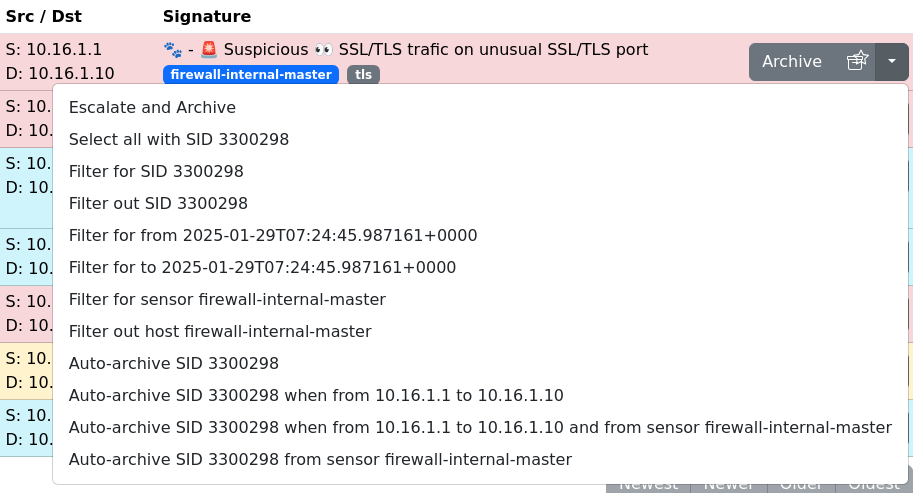
From an alert, you can now choose to have future occurrences of that alert auto-archived.
Currently supported filters include:
I hope to provide a more flexible filtering solution along the lines of email filtering in the near future.
In an alert view, hover over the signature or an IP address and you
will see a + or - to filter for, or filter out alerts. This is a
work in progress and will be brought to more pages and dashboards over
time.
SQLite results can be slow when the dataset is large. To address this a timeout has been added to the Inbox so results will be returned in a timely manner. By default this is 5 seconds.
Also, in the Dashboard aggregations, data will be streamed as its available. So you should see data in the tables right away, and results will be added as they are available.
Just a note that I will no longer being provided MacOS or Linux Arm32 binary builds. EveBox should still fine on these systems, however I don't have the equipment to test myself. Sorry for any inconvenience.